
No-Code Digital Storytelling Example: Rembrandt’s Self-Portrait at Kenwood House

Rachael Cristine Woody
In a previous post, we received an introduction to “scrollytelling” and visual storytelling platforms for museums. This post continues our exploration of storytelling platforms with the review of a second no-code example: “Rembrandt: Self-Portrait with Two Circles,” a digital exhibit created by English Heritage’s Kenwood House.
Kenwood opens the story with Rembrandt’s self-portrait in motion. As you scroll down the prescriptive linear pathway, there are additional paintings and large text to continue the story.
Details of Kenwood’s Rembrandt Exhibit
- Online Exhibit: Rembrandt Self-Portrait with Two Circles
- Institution: English Heritage’s Kenwood House
- Digital Publishing Platform: Shorthand
Storytelling Infrastructure
The storytelling infrastructure for this example is:
- Story Path: Linear Pathway
- Storytelling Performance Types: Written, Visual
- Sensory Setting: Color
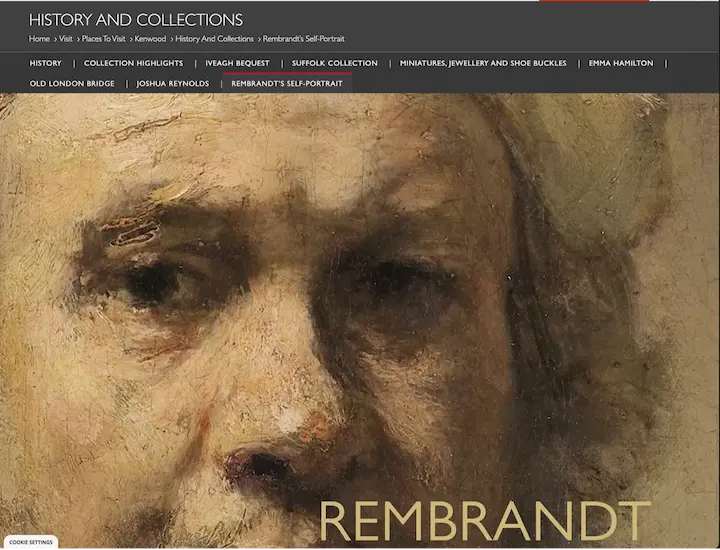
A still photo from “Rembrandt Self-Portrait with Two Circles.” Source: English Heritage’s Kenwood House, https://www.english-heritage.org.uk/visit/places/kenwood/history-stories-kenwood/rembrandt-self-portrait/. This image displays the landing page image for the Rembrandt online exhibit.
Storytelling Tools: Hot Spots Paired with Deep Zoom
Zoom display functionality isn’t directly offered in the story; however, it is paired with hot spot functionality (as seen in the Hoover example in a previous post). In this example, the tool follows an x-ray image of the painting with text describing the differences in the version revealed by the x-ray versus the finished result.
The information provided by the hot spots focuses on painting techniques. There are seven hot spots in total; that number does not overwhelm visitors with too many options for information.

A still photo from “Rembrandt Self-Portrait with Two Circles.” Source: English Heritage’s Kenwood House, https://www.english-heritage.org.uk/visit/places/kenwood/history-stories-kenwood/rembrandt-self-portrait/. This image displays a hot spot engagement tool that offers visitors the ability to click on specified areas of the painting to learn more about the artist’s technique.
Storytelling Tool: Explore More
The final tool is an “Explore More” grid that follows the conclusion of the story. Each story suggested at the bottom is a separate and stand-alone story from the Kenwood collections. The options offer a focus on popular people or a broader overview of collection areas.

A still photo from “Rembrandt Self-Portrait with Two Circles.” Source: English Heritage’s Kenwood House, https://www.english-heritage.org.uk/visit/places/kenwood/history-stories-kenwood/rembrandt-self-portrait/. This image the “Explore More” section at the bottom of the main online exhibit page. There are 6 tiles that contain images and suggested topics to browse next.
Prescriptive Paths and Passive Dynamism in Digital Storytelling
Kenwood’s inclusion of only a few artworks and one engagement tool within the story matches the simplicity of the prescriptive linear pathway. While there is only one call for engagement within the story, the animated deep zoom areas of the artworks offer a “passive dynamism” to the story.
The additional incorporation of the X-ray image offers an interesting break from the rest of the visuals and is a rare “behind the scenes” glimpse into the artwork. The overall effect is an enjoyable and easy-to-consume story pathway with options for additional stories offered at the end of the path.
Seeking a high tech museum CMS that allows you to offer engaging storytelling audio-visual experiences and share more information with online visitors? Get in touch to learn more about Argus!
Rachael Cristine Woody
Rachael Woody advises on museum strategies, digital museums, collections management, and grant writing for a wide variety of clients. She has authored several titles published by Lucidea Press, including her latest: Demystifying Data Preparation for a New CMS. Rachael is a regular contributor to the Think Clearly blog and presents a popular webinar series covering topics of importance to museum professionals.
**Disclaimer: Any in-line promotional text does not imply Lucidea product endorsement by the author of this post.
Never miss another post. Subscribe today!
Similar Posts

Power in Partnerships: The Peer-to-Peer Bridge Model for a Shared CMS
The Peer-to-Peer Bridge offers a collaborative CMS model that allows museums to maintain independent systems while still supporting shared access, coordinated stewardship, and strategic partnership.

Power in Partnerships: The Unified Hub
A Unified Hub lets multiple museums leverage the power of one system—cutting IT costs, boosting collaboration, and expanding global discovery of their collections data.

Power in Partnerships: 3 Models for Sharing a Museum Collections Management System
Learn about partnership models for sharing a museum CMS—unified databases, shared access, and discovery portals—to reduce cost and expand discovery.

The Amplified Ask: Museum Fundraising Partnerships
Explore three real museum fundraising partnerships and the repeatable elements that make joint campaigns, products, and events successful.
Leave a Comment
Comments are reviewed and must adhere to our comments policy.
0 Comments