
Digital Storytelling in Museums with Code-Based Exhibits: The USC Digital Voltaire Project

Rachael Cristine Woody
In a previous post, we received an introduction to visual storytelling platforms (and the concept of “scrollytelling”). This post continues our exploration of storytelling platforms and dynamic display tools with a review of a code-based example: “USC Digital Voltaire.” This project stems from “The USC Voltaire Letters Project: A Polymathic, Multimedia-Rich Digital Initiative” by the University of Southern California (USC).
For this project, USC used Scalar, an open-source publishing platform developed by the university. Scalar is freely available on GitHub. The project opens with a high-resolution portrait of Voltaire, welcoming visitors into an immersive digital exhibit rooted in primary sources.

A still photo from “USC Digital Voltaire.” Source: USC Libraries, https://scalar.usc.edu/works/voltaire/index. This image displays the landing page image for the Voltaire online exhibit.
Upon clicking into the “Browse the Letters” section, visitors are presented with a chronological list of Voltaire’s letters. The exhibit does not offer any additional introduction, instead letting the body of correspondence tell its own story.
The display tools are available when viewing each letter. Because the materials are text-based, the letters are not stunning in a visual sense; however, the embedded information via display tools is a contextual goldmine.
Details of USC’s Digital Voltaire Project
- Online Exhibit: Digital Voltaire Project
- Institution: University of Southern California
- Digital Publishing Platform: University of Southern California’s Scalar (open-source)
Storytelling Infrastructure
The storytelling infrastructure for this example is:
- Story Path: Linear Pathway
- Storytelling Performance Types: Written, Visual
- Sensory Setting: Color
Each letter is a high-resolution scan displayed on the right, paired with a line-by-line translation provided in computer text on the left. Throughout the translated text, there are folded-paper icons, hyperlinked text, and footnotes.
Tool: Pop-up Information Windows
Clicking on the folded-paper icon reveals additional contextual information and, in some cases, a visual example. As shown in the example below, the folded-paper icon next to a reference to Frederick the Great’s father triggers a pop-up with background information and a portrait of Frederick William I.
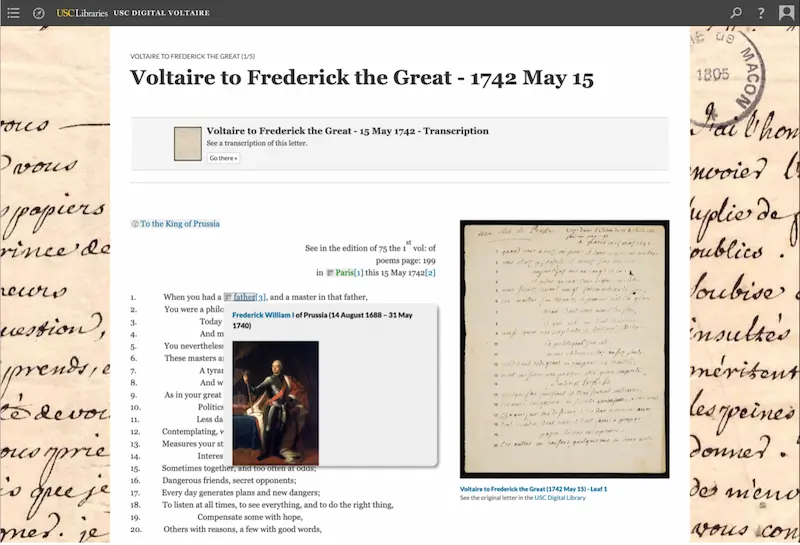
A still photo from “Voltaire to Frederick the Great – 1742 May 15.” Source: USC Libraries, https://scalar.usc.edu/works/voltaire/voltaire-to-frederick–15-may-1742. This image displays a portion of a letter in the Voltaire online exhibit. At the top is the title of the letter with identification of who Voltaire was writing to and the date of the letter.
On the left of the screen is a line-by-line transcription of the letter in English with hyperlinks to read more about people, places, and events. On the right is an image of the scanned letter. This image features the pop-up information provided when the folded-paper icon is clicked.
Tool: Hyperlinked Text
In this example letter, the hyperlink introduced in line 21 connects the viewer to the second page of the letter, where this quote appears. These hyperlinks are used throughout the letters as reliable page links for when the letter has progressed to the next page.

“Voltaire to Frederick the Great – 1742 May 15.” Source: USC Libraries, https://scalar.usc.edu/works/voltaire/voltaire-to-frederick–15-may-1742. This image displays a portion of a letter in the Voltaire online exhibit. This section of the translated text has an accompanying hyperlink to show the viewer a scan of the second page of the letter that contains this quote.

A still photo from “Voltaire to Frederick the Great – 1742 May 15.” Source: USC Libraries, https://scalar.usc.edu/works/voltaire/voltaire-to-frederick–15-may-1742. This image displays a portion of a letter in the Voltaire online exhibit. This section of the translated text has an accompanying hyperlink to show the viewer a scan of the second page of the letter that contains this quote.
Tool: Footnotes
The footnotes follow a familiar academic style. As source citations are not needed for an original piece of correspondence, the footnotes are used instead to link to more information, offer citations to letters elsewhere in the collections, and offer interpretation of specific passages that may hold further interest or significance.
The Digital Voltaire Project in Context
The Voltaire story is one told through the primary sources themselves. There’s no additional author narration, making this project an unusual entry among the examples reviewed this far. Additionally, USC Libraries’ approach relies on traditional academic tools, such as line-by-line translations, hyperlinks, and footnotes, to present these historical letters with clarity and depth.
The interlinking of digital surrogates and the layers of contextual information make this an interesting example of a “virtual archives”. Although this example is solidly in the academic area of the story spectrum, its ability to connect meaningful information is a lesson that any storyteller can use.
For museums and cultural institutions, the Digital Voltaire Project of how to digitally publish collections with layers of interactivity and interpretation. It’s a reference point for designing exhibits that connect users not only with content but with context.
Seeking a high-tech museum CMS that allows you to offer engaging audio-visual experiences and share more information with online visitors? Get in touch to learn more about Argus!
Rachael Cristine Woody
Curious about this topic? Please join us for the companion webinar, Introduction to Visual Storytelling Platforms, on April 30, 2025, at 11 a.m. Pacific / 2 p.m. Eastern. (Can’t make it? Register anyway and we will send you a link to the recording afterwards). Register now to reserve your spot!
**Disclaimer: Any in-line promotional text does not imply Lucidea product endorsement by the author of this post.
Never miss another post. Subscribe today!
Similar Posts

Culture on Tap: The Power of Commercial-Cultural Partnerships
When cultural heritage aligns intentionally with local business goals, it unlocks a powerful value exchange that transforms heritage into an economic engine, aligning historical narratives with local commerce.

Civic Catalysts: How Museums and Local Governments Build Resilient Communities
Building alliances with local government shifts museums from the margins of community planning directly into the center of civic life. Detailed analysis of how the resulting ecosystem fortifies museum operations.

Joint Ventures in Museopreneurship: 3 Collaborative Models
The future of museum sustainability belongs to institutions that lean into collaboration rather than isolation, through shared art acquisitions, innovative brand franchising, or membership networks, amplifying impact while mitigating risk.

Unlock the Vault: How Museopreneurs Turn Content into Revenue
While launching paid digital content initiatives requires a shift in operations, technology, and mindset, the financial and educational rewards of scaling your museum’s impact online are undeniable.
Leave a Comment
Comments are reviewed and must adhere to our comments policy.
0 Comments